Obsidian 中的影视墙
Sync Vault 支持流媒体在线播放,同时支持 视频笔记 。现在,Sync Vault 变得更加强大了,不仅打通了 看–记–回放 这条链路,还让看到记的过程更加自动化:随着视频播放,笔记中的元数据会自动更新。比如视频播放进度,封面信息 等,再次播放的时候能自动识别进度并从当前进度开始播放。
本文介绍如何在 Obsidian 中通过 Dataview 插件 + Sync Vault 插件 制作网盘影视库,这样就可以更加方便地管理自己看过的视频了。整体效果如下图所示:
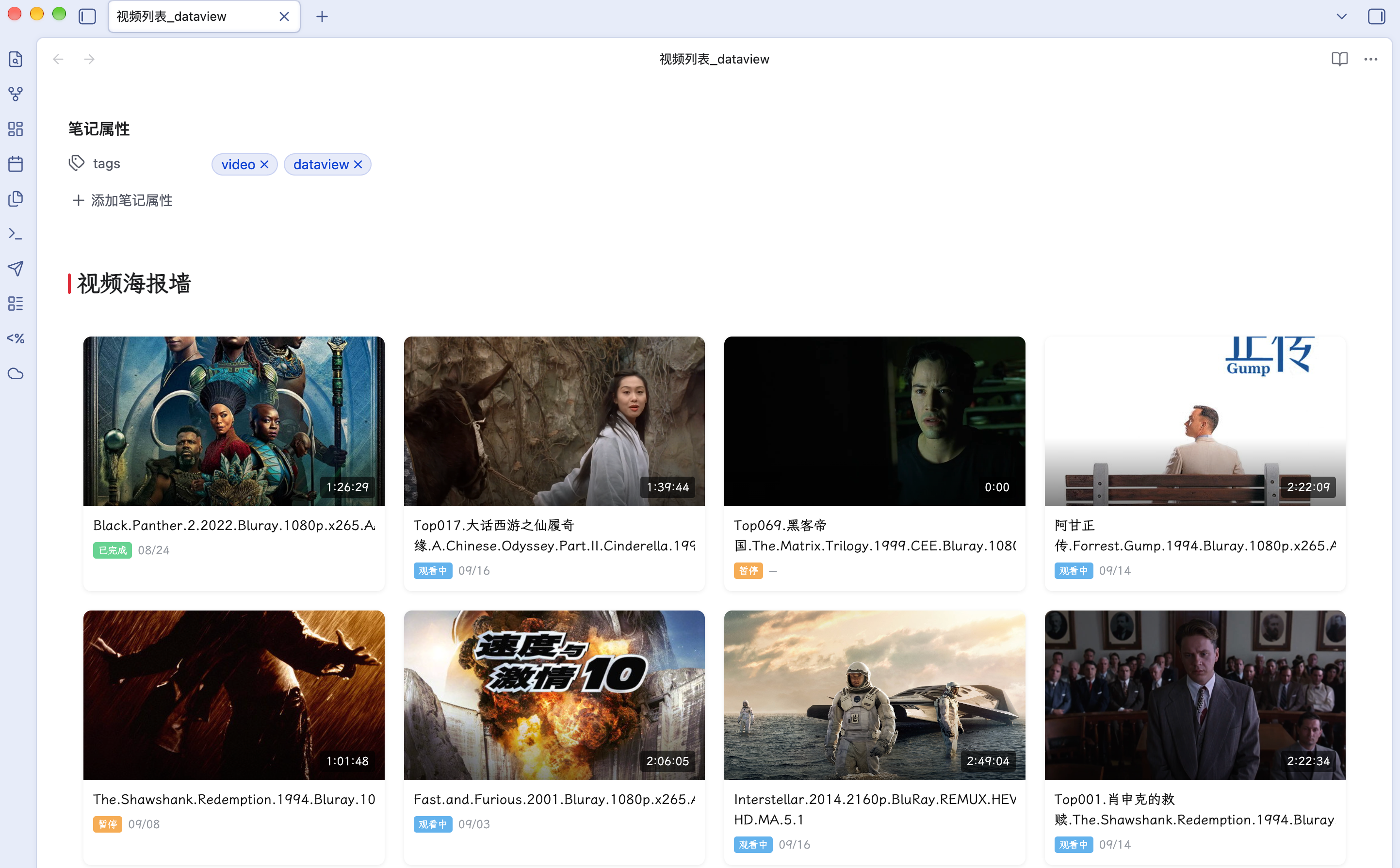
- 动态渲染笔记:笔记更新后会自动更新视图。
- 鼠标悬停显示播放按钮,点击播放按钮后直接播放。
基本原理
在视频播放过程中,Sync Vault 会自动更新笔记的 frontmatter。DataviewJS 通过遍历笔记 frontmatter 数据进行渲染。同时支持播放按钮,可以一键打开视频播放界面,通过 Sync Vault 注册的 obsidian://cloud-video-seek 协议实现。
其实界面也可以用内置的 Obsidian Base,Base 插件的优势在于可以通过工具栏灵活地过滤,响应也迅速,缺点是无法渲染播放按钮,因此我这里目前采用了 DataviewJS 的方式。期待官方的 Base插件 能增强动态能力。
支持哪些视频源
支持本地视频,同时支持的在线视频源包括:百度网盘、阿里云盘、夸克网盘、OneDrive、Bilibili 视频。
视频演示
附录:Dataview 代码
try {
const pages = Array.from(dv.pages('"Video Notes"').where(p => p.video != null));
pages.sort((a, b) => (a["video-progress"] || 0) - (b["video-progress"] || 0));
console.log('[Wall] pages count:', pages.length);
if (pages.length > 0) {
  const first = pages[0];
  console.log('[Wall] first page video:', String(first.video), 'position:', first['video-position']);
}

const containerStyle = "display: grid; grid-template-columns: repeat(auto-fill, minmax(280px, 1fr)); gap: 20px; padding: 16px; width: 100%;";
const cardBaseStyle = "background: #fff; border-radius: 8px; overflow: hidden; cursor: pointer; transition: transform 0.2s ease, box-shadow 0.2s ease; box-shadow: 0 1px 4px rgba(0,0,0,0.08);";
const cardHoverStyle = "transform: translateY(-4px); box-shadow: 0 8px 24px rgba(0,0,0,0.12);";

let html = `<div style="${containerStyle}">`;
for (const p of pages) {
  const title = p.file.name.replace(/\.md$/, "");
  const shortTitle = title.replace(/^\d+\./, '');
  const coverLink = p["video-cover"];
  let coverPath = "";
  if (coverLink) {
    const coverStr = coverLink instanceof Object ? (coverLink.path || String(coverLink)) : String(coverLink);
    coverPath = coverStr.replace(/\[\[|\]\]/g, "").replace(/#.*/, "").trim();
  }
  const duration = p["video-duration"] || 0;
  const durMin = Math.floor(duration / 60);
  const durSec = duration % 60;
  const durH = Math.floor(durMin / 60);
  const durM = durMin % 60;
  const durationStr = durH > 0 ? `${durH}:${String(durM).padStart(2,'0')}:${String(durSec).padStart(2,'0')}` : `${durM}:${String(durSec).padStart(2,'0')}`;
  const playBtn = `<div class="play-btn" data-video="${String(p.video || '')}" data-position="${String(p['video-position'] || '')}" style="position:absolute; top:50%; left:50%; transform:translate(-50%,-50%) scale(0.9); width:48px; height:48px; background:rgba(0,0,0,0.55); backdrop-filter:blur(4px); border-radius:50%; display:flex; align-items:center; justify-content:center; cursor:pointer; z-index:10; opacity:0; transition:opacity 0.2s ease, transform 0.2s ease;"><svg width="20" height="20" viewBox="0 0 24 24" fill="white" style="margin-left:3px;"><path d="M8 5v14l11-7z"/></svg></div>`;
  const coverHtml = coverPath ? `<div style="position:relative; width:100%; aspect-ratio: 16 / 9; overflow:hidden; border-radius:8px 8px 0 0;" class="cover-wrap"><img src="${coverPath}" alt="${shortTitle}" style="width:100%; height:100%; object-fit:cover; display:block;" loading="lazy" onerror="this.style.display='none'"><div style="position:absolute; inset:0; background:linear-gradient(to top, rgba(0,0,0,0.5) 0%, transparent 40%);"></div><div style="position:absolute; bottom:8px; left:10px; right:10px; display:flex; justify-content:flex-end; align-items:center; color:#fff; font-size:12px; font-weight:500;"><span style="background:rgba(0,0,0,0.6); padding:2px 6px; border-radius:3px;">${durationStr}</span></div>${playBtn}</div>` : `<div style="width:100%; aspect-ratio: 16 / 9; background:#f0f0f0; border-radius:8px 8px 0 0; position:relative; display:flex; align-items:center; justify-content:center; color:#999; font-size:12px;">No Cover</div>`;
  const titleHtml = `<div class="title-link" data-path="${p.file.path}" style="display:block; color:#111; font-weight:500; font-size:14px; line-height:1.5; margin-top:10px; padding:0 10px; text-decoration:none; cursor:pointer; overflow:hidden;"><div style="display:-webkit-box; -webkit-line-clamp:2; -webkit-box-orient:vertical; overflow:hidden;">${shortTitle}</div></div>`;
  const statusText = p["video-status"] || "watching";
  const metaHtml = `<div style="padding:6px 10px 12px; display:flex; align-items:center; gap:6px; font-size:12px; color:#9499a0;"><span style="background:${statusText === 'done' ? '#68d391' : statusText === 'watching' ? '#63b3ed' : '#f6ad55'}; color:#fff; border-radius:3px; padding:1px 5px; font-size:10px; font-weight:500;">${statusText === 'done' ? '已完成' : statusText === 'watching' ? '观看中' : '暂停'}</span><span>${p["video-last-played"] ? new Date(p["video-last-played"]).toLocaleDateString('zh-CN', {month:'2-digit', day:'2-digit'}) : '--'}</span></div>`;
  html += `<div class="wall-card" style="${cardBaseStyle}" onmouseenter="this.style.cssText='${cardHoverStyle}'" onmouseleave="this.style.cssText='${cardBaseStyle}'">${coverHtml}${titleHtml}${metaHtml}</div>`;
}
html += "</div>";
const container = dv.el("div", html, { cls: "" });
console.log('[PlayBtn] container tag:', container.tagName, 'children:', container.children.length);
const btns = container.querySelectorAll('.play-btn[data-video]');
console.log('[PlayBtn] found', btns.length, 'buttons');
const titleLinks = container.querySelectorAll('.title-link[data-path]');
console.log('[Wall] found', titleLinks.length, 'title links');
titleLinks.forEach((el) => {
  el.addEventListener('click', function(e) {
    e.stopPropagation();
    const path = this.getAttribute('data-path');
    console.log('[Wall] title click:', path);
    if (path && app && app.workspace) {
      app.workspace.openLinkText(path, '', true);
    }
  });
});
btns.forEach((btn, i) => {
  const videoRaw = btn.getAttribute('data-video');
  const posStr = btn.getAttribute('data-position');
  console.log('[PlayBtn] btn[' + i + ']:', { videoRaw, posStr });
  const wrap = btn.closest('.cover-wrap');
  if (wrap) {
    wrap.addEventListener('mouseenter', function() { btn.style.opacity = '1'; });
    wrap.addEventListener('mouseleave', function() { btn.style.opacity = '0'; });
  }
  btn.addEventListener('click', function(e) {
    e.stopPropagation();
    e.preventDefault();
    const videoRaw = this.getAttribute('data-video');
    const posStr = this.getAttribute('data-position');
    console.log('[PlayBtn] CLICK', { videoRaw, posStr });
    if (!videoRaw) return;
    const videoUrl = String(videoRaw).trim();
    const match = videoUrl.match(/^quark:\/\/(.+)$/);
    if (!match) { console.log('[PlayBtn] quark mismatch:', videoUrl); return; }
    const filePath = '/' + match[1];
    const encoded = encodeURIComponent(filePath);
    let ts = 0;
    if (posStr) {
      const parts = posStr.split(':').map(Number);
      if (parts.length === 2) ts = parts[0] * 60 + parts[1];
      else if (parts.length === 3) ts = parts[0] * 3600 + parts[1] * 60 + parts[2];
    }
    const uri = 'obsidian://cloud-video-seek?file=' + encoded + '&ts=' + ts + '&type=quark';
    console.log('[PlayBtn] URI:', uri);
    window.location.href = uri;
  });
});
} catch(e) { console.error('[Wall] ERROR', e); }