
Sync Vault supports online streaming playback, and it also supports video notes. Now Sync Vault has become even more powerful: it doesn’t just connect the watch → note → replay loop — it also makes the watch-to-note process more automated. As a video plays, the metadata in your notes updates automatically — playback progress, cover art, and more. Next time you hit play, Sync Vault detects your progress and resumes right where you left off.
This post shows how to build a cloud-drive Movie & TV library in Obsidian using the Dataview plugin + Sync Vault, so you can manage the videos you’ve watched more conveniently. Here’s the overall result
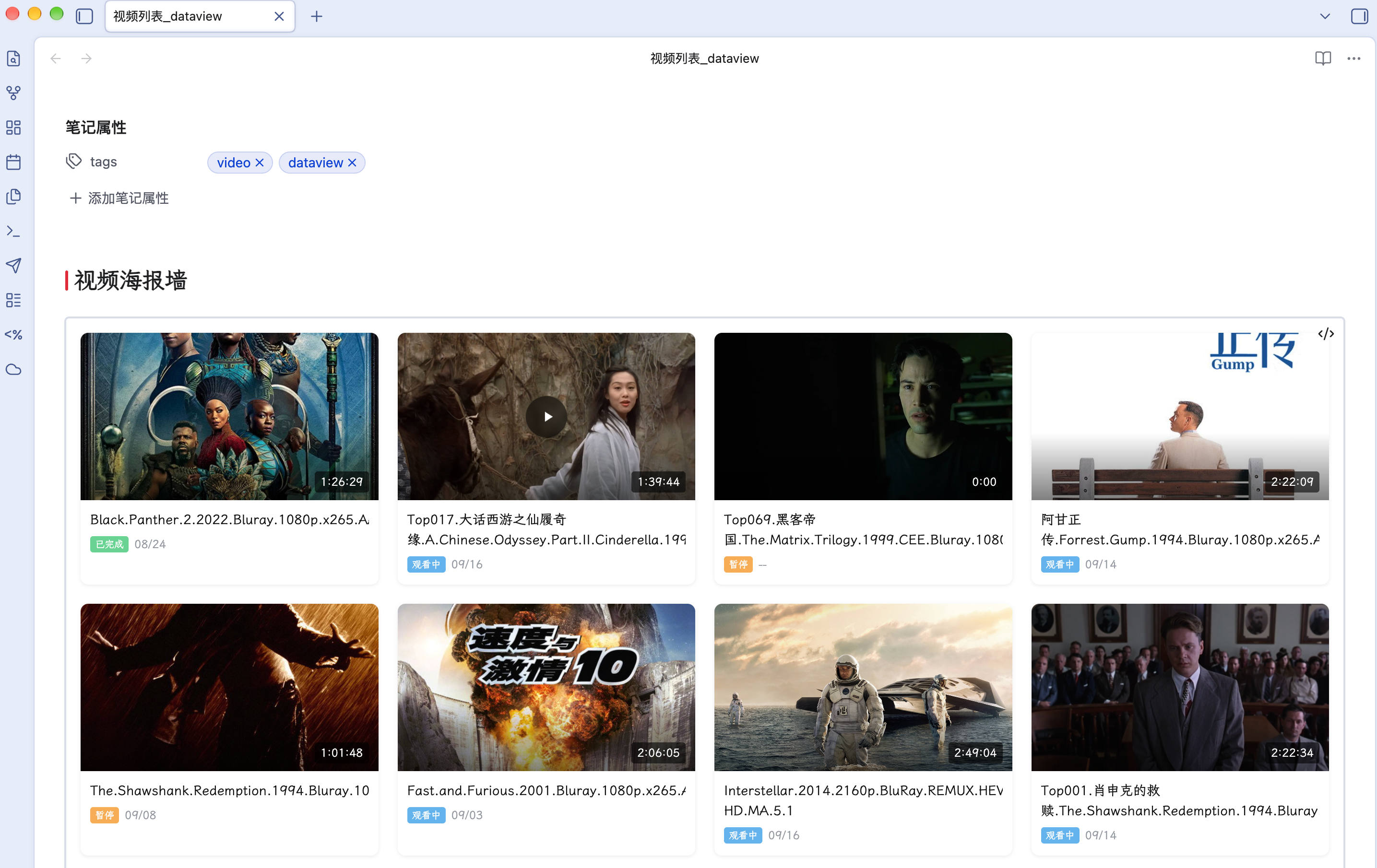
- 动态渲染笔记:笔记更新后会自动更新视图。
- 鼠标悬停显示播放按钮,点击播放按钮后直接播放。
Howto
Sync Vault will update frontmatter automatically during playback。DataviewJS renders by visiting frontmatter。
One-click to open video workspace,through inline obsidian://cloud-video-seek protocol。
Although we can implement similar result through Obsidian Base,Base plugin works faster, but lacks ability to render dynamically. So we use DataviewJS currently。Hope the official base plugin could be enhanced.
Which Video Source Type
Local video,and video from baidu cloud disk, alibaba cloud disk, quark disk, OneDrive and self defined source through connector。
Bilibili Video
Attachment:DataviewJS Code
try {
const pages = Array.from(dv.pages('"Video Notes"').where(p => p.video != null));
pages.sort((a, b) => (a["video-progress"] || 0) - (b["video-progress"] || 0));
console.log('[Wall] pages count:', pages.length);
if (pages.length > 0) {
  const first = pages[0];
  console.log('[Wall] first page video:', String(first.video), 'position:', first['video-position']);
}

const containerStyle = "display: grid; grid-template-columns: repeat(auto-fill, minmax(280px, 1fr)); gap: 20px; padding: 16px; width: 100%;";
const cardBaseStyle = "background: #fff; border-radius: 8px; overflow: hidden; cursor: pointer; transition: transform 0.2s ease, box-shadow 0.2s ease; box-shadow: 0 1px 4px rgba(0,0,0,0.08);";
const cardHoverStyle = "transform: translateY(-4px); box-shadow: 0 8px 24px rgba(0,0,0,0.12);";

let html = `<div style="${containerStyle}">`;
for (const p of pages) {
  const title = p.file.name.replace(/\.md$/, "");
  const shortTitle = title.replace(/^\d+\./, '');
  const coverLink = p["video-cover"];
  let coverPath = "";
  if (coverLink) {
    const coverStr = coverLink instanceof Object ? (coverLink.path || String(coverLink)) : String(coverLink);
    coverPath = coverStr.replace(/\[\[|\]\]/g, "").replace(/#.*/, "").trim();
  }
  const duration = p["video-duration"] || 0;
  const durMin = Math.floor(duration / 60);
  const durSec = duration % 60;
  const durH = Math.floor(durMin / 60);
  const durM = durMin % 60;
  const durationStr = durH > 0 ? `${durH}:${String(durM).padStart(2,'0')}:${String(durSec).padStart(2,'0')}` : `${durM}:${String(durSec).padStart(2,'0')}`;
  const playBtn = `<div class="play-btn" data-video="${String(p.video || '')}" data-position="${String(p['video-position'] || '')}" style="position:absolute; top:50%; left:50%; transform:translate(-50%,-50%) scale(0.9); width:48px; height:48px; background:rgba(0,0,0,0.55); backdrop-filter:blur(4px); border-radius:50%; display:flex; align-items:center; justify-content:center; cursor:pointer; z-index:10; opacity:0; transition:opacity 0.2s ease, transform 0.2s ease;"><svg width="20" height="20" viewBox="0 0 24 24" fill="white" style="margin-left:3px;"><path d="M8 5v14l11-7z"/></svg></div>`;
  const coverHtml = coverPath ? `<div style="position:relative; width:100%; aspect-ratio: 16 / 9; overflow:hidden; border-radius:8px 8px 0 0;" class="cover-wrap"><img src="${coverPath}" alt="${shortTitle}" style="width:100%; height:100%; object-fit:cover; display:block;" loading="lazy" onerror="this.style.display='none'"><div style="position:absolute; inset:0; background:linear-gradient(to top, rgba(0,0,0,0.5) 0%, transparent 40%);"></div><div style="position:absolute; bottom:8px; left:10px; right:10px; display:flex; justify-content:flex-end; align-items:center; color:#fff; font-size:12px; font-weight:500;"><span style="background:rgba(0,0,0,0.6); padding:2px 6px; border-radius:3px;">${durationStr}</span></div>${playBtn}</div>` : `<div style="width:100%; aspect-ratio: 16 / 9; background:#f0f0f0; border-radius:8px 8px 0 0; position:relative; display:flex; align-items:center; justify-content:center; color:#999; font-size:12px;">No Cover</div>`;
  const titleHtml = `<div class="title-link" data-path="${p.file.path}" style="display:block; color:#111; font-weight:500; font-size:14px; line-height:1.5; margin-top:10px; padding:0 10px; text-decoration:none; cursor:pointer; overflow:hidden;"><div style="display:-webkit-box; -webkit-line-clamp:2; -webkit-box-orient:vertical; overflow:hidden;">${shortTitle}</div></div>`;
  const statusText = p["video-status"] || "watching";
  const metaHtml = `<div style="padding:6px 10px 12px; display:flex; align-items:center; gap:6px; font-size:12px; color:#9499a0;"><span style="background:${statusText === 'done' ? '#68d391' : statusText === 'watching' ? '#63b3ed' : '#f6ad55'}; color:#fff; border-radius:3px; padding:1px 5px; font-size:10px; font-weight:500;">${statusText === 'done' ? '已完成' : statusText === 'watching' ? '观看中' : '暂停'}</span><span>${p["video-last-played"] ? new Date(p["video-last-played"]).toLocaleDateString('zh-CN', {month:'2-digit', day:'2-digit'}) : '--'}</span></div>`;
  html += `<div class="wall-card" style="${cardBaseStyle}" onmouseenter="this.style.cssText='${cardHoverStyle}'" onmouseleave="this.style.cssText='${cardBaseStyle}'">${coverHtml}${titleHtml}${metaHtml}</div>`;
}
html += "</div>";
const container = dv.el("div", html, { cls: "" });
console.log('[PlayBtn] container tag:', container.tagName, 'children:', container.children.length);
const btns = container.querySelectorAll('.play-btn[data-video]');
console.log('[PlayBtn] found', btns.length, 'buttons');
const titleLinks = container.querySelectorAll('.title-link[data-path]');
console.log('[Wall] found', titleLinks.length, 'title links');
titleLinks.forEach((el) => {
  el.addEventListener('click', function(e) {
    e.stopPropagation();
    const path = this.getAttribute('data-path');
    console.log('[Wall] title click:', path);
    if (path && app && app.workspace) {
      app.workspace.openLinkText(path, '', true);
    }
  });
});
btns.forEach((btn, i) => {
  const videoRaw = btn.getAttribute('data-video');
  const posStr = btn.getAttribute('data-position');
  console.log('[PlayBtn] btn[' + i + ']:', { videoRaw, posStr });
  const wrap = btn.closest('.cover-wrap');
  if (wrap) {
    wrap.addEventListener('mouseenter', function() { btn.style.opacity = '1'; });
    wrap.addEventListener('mouseleave', function() { btn.style.opacity = '0'; });
  }
  btn.addEventListener('click', function(e) {
    e.stopPropagation();
    e.preventDefault();
    const videoRaw = this.getAttribute('data-video');
    const posStr = this.getAttribute('data-position');
    console.log('[PlayBtn] CLICK', { videoRaw, posStr });
    if (!videoRaw) return;
    const videoUrl = String(videoRaw).trim();
    const match = videoUrl.match(/^quark:\/\/(.+)$/);
    if (!match) { console.log('[PlayBtn] quark mismatch:', videoUrl); return; }
    const filePath = '/' + match[1];
    const encoded = encodeURIComponent(filePath);
    let ts = 0;
    if (posStr) {
      const parts = posStr.split(':').map(Number);
      if (parts.length === 2) ts = parts[0] * 60 + parts[1];
      else if (parts.length === 3) ts = parts[0] * 3600 + parts[1] * 60 + parts[2];
    }
    const uri = 'obsidian://cloud-video-seek?file=' + encoded + '&ts=' + ts + '&type=quark';
    console.log('[PlayBtn] URI:', uri);
    window.location.href = uri;
  });
});
} catch(e) { console.error('[Wall] ERROR', e); }